




The newly designed site and Wiki have gone live and are working fine. The Blog, on the other-hand while completed is not wanting to go live. I’ve tried it as blog.ffextensionguru.com but something was not routing correctly on Apache. So I tried re-mapping ffextensionguru.info to go the new blog, but that still wants to resolve to the main site. I’ve completely remove blog.ffextensionguru.com and remapped it to the new blog folder. Now I am just waiting for Apache to restart and hopefully I will be able to launch the new blog soon.
We’re Experiencing Some Technical Difficulties
Posted: Saturday, January 8, 2011 by El Guru in Blog News, Site News1
Phases 1 and 2 of the ‘big changes’ are already or nearly completed. Earlier this week, we did move over the Wiki, the main site, The Email Mafiia blog and sites and a handful of other sites to the new sever. Surprisingly, the migration went a lot smoother than I was expecting. Did some have minor issues with the Wiki, but was able to get those resolved very quickly.
As for the main site, just have a little more tweaking and adjusting to do before we launch the new main site. So far, I am very impressed with the flexibility of being able to work in WordPress. I had heard some complaints from a friend of mine about how the first page is still going to look like a WordPress Blog (shows post title, author, date, etc). Well, thanks to the Twenty Ten Weaver Theme, you wouldn’t know this was built on WordPress.
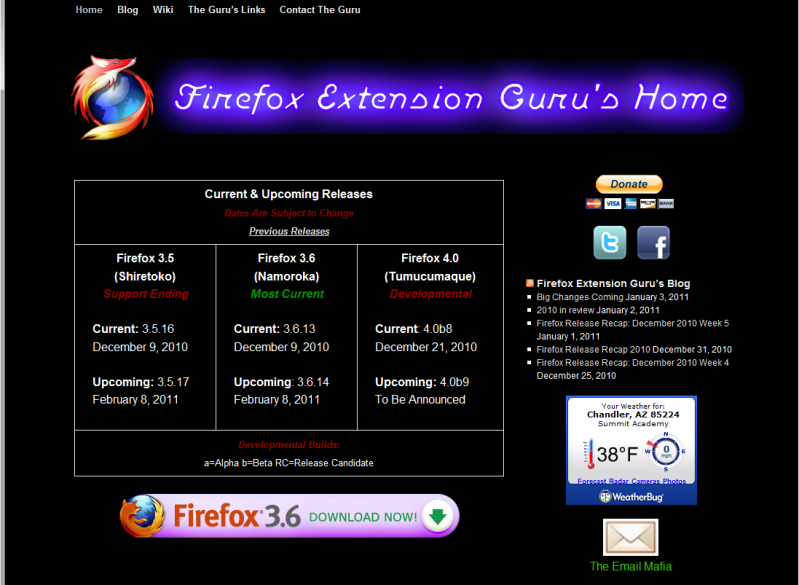
The biggest thing you are going to notice is we really cleaned up the main page. The big Facebook & Twitter widgets have been removed, replaced with buttons. The releases section has been cleaned up a bit as well. There really isn’t much going on with main page. It is acting more as landing page with links to the Blog and Wiki as well as to our sister site, The Email Mafia.
I have decided to move the Wiki to Phase 3 instead of Phase 4. The template is still going to take some tweaking, but should be fairly simple as all I will need to do is copy over the custom CSS and install a few plug-ins. The fun part is going to be moving the content from Media Wiki into WordPress.
The final phase will be the blog. That really should not take very long as I won’t have to ‘de-blog’ the template. Upload the new header, import the content then install some pliug-ins and should be ready to go. Will need to figure out how to redirect on the wordpress.com side over to my server as right now my server is redirecting to the wordpress.com site.
One more thing, since this whole process went fairly well, there’s a good chance I am going to redo the main Email Mafia site into a WordPress as well and creating a ‘wiki’ for that site too.
I’ve been wanting to make the move to the self hosted WordPress for a while now. Unfortunately, the hosting service which is included in my reseller package at my current provider is not optimized to handle WordPress. This was kind the reason I was keeping the package with them was the hosting and some other ‘freebies’ I was getting. Towards the end of last year I noticed I really wasn’t using these free items anymore.
I happened to get a hold of a very good discount which allowed me to get a new 3-years hosting package for less than I am paying for the reseller package. Of course the fun part is moving everything over from one host to another. I’ve walked customers through this many of times so I have a fairly good idea what is involved. As of this post the main ffextensionguru.com site and wiki are down and will be for the next several hours while everything migrates over to the new hosting.
Now, I was also able to get sometime off so I have a long weekend coming up. So I will start the process of moving the blog from WordPress.com over to my new host. In addition I am looking to convert the main site into a WordPress site. The wiki is going to be going away soon. I am also going to convert that into a WordPress site too. I had some issues with the last update broke the Wiki. I was able to rollback but I don’t want to keep running on an older version as it can be a security risk. On the other hand, I don’t feel like trying to figure out what plug-in is causing the conflict. It would just be easier to start fresh as a WordPress site. This is going to make editing a lot easier as working within Media Wiki is not easy.
For the time being, the main site and the Wiki are being moved over as-is and will remain active until I make the switch over. The blog should move over fairly easily as I can redirect with the WordPress.com interface. I hope to have most of this done by Saturday, January 8th. The Wiki has the lowest priority in getting setup, but I don’t think it is going to be very difficult.
The stats helper monkeys at WordPress.com mulled over how this blog did in 2010, and here’s a high level summary of its overall blog health:

The Blog-Health-o-Meter™ reads Wow.
Crunchy numbers

A helper monkey made this abstract painting, inspired by your stats.
The Louvre Museum has 8.5 million visitors per year. This blog was viewed about 250,000 times in 2010. If it were an exhibit at The Louvre Museum, it would take 11 days for that many people to see it.
In 2010, there were 174 new posts, growing the total archive of this blog to 1312 posts.
The busiest day of the year was June 27th with 1 views. The most popular post that day was A Look At Firefox 3.7a6pre (Minefield).
Where did they come from?
The top referring sites in 2010 were stumbleupon.com, mozillalinks.org, dailyrotation.com, Google Reader, and google.com.
Some visitors came searching, mostly for firefox error 203, java console, foxit vs adobe, firefox 3.6 release date, and firefox cookies.
Attractions in 2010
These are the posts and pages that got the most views in 2010.
1
A Look At Firefox 3.7a6pre (Minefield) June 2010
8 comments
2
Adobe Acrobat vs Foxit Reader September 2006
47 comments
3
Hide Menu Bar in Firefox 3.6 December 2009
13 comments
4
Managing Cookies with Firefox 3.5 July 2009
15 comments
5
Uninstalling JAVA Console Add-on April 2010
19 comments
Firefox Release Recap: December 2010 Week 5
Posted: Saturday, January 1, 2011 by El Guru in Firefox, Fx 3.5, Fx 3.6, Fx 3.7, Fx 4.0, Mozilla News
Just Released
- None
Schedule this Coming Week
- None
Future Release
- Firefox 3.5.17 – February 8th
- Firefox 3.6.14 – February 8th
- Firefox 4.0 Beta 9 – TBA
- Firefox 4.0 Beta 10 – TBA
- Firefox 4.0 Release Candidate 1 – TBA
- Firefox 4.0 – TBA
Firefox Release Recap 2010
Posted: Friday, December 31, 2010 by El Guru in Firefox, Fx 3.0, Fx 3.5, Fx 3.6, Fx 3.7, Mozilla News, Year In ReviewHappy New Year’s Eve! It is that time again, time for our annual look back at the Firefox releases of this year. In 2010 we saw with retirement of the Firefox 3.0 branch which had been active since the first Alpha release back in December 2006. Development continued on the Firefox 3.5 branch which Mozilla still warns ‘will be maintained with security and stability updates until August 2010’ even though there has been several releases since and more planned in 2011. In early 2010, the final release candidates along with the opening release of Firefox 3.6 in January. Finally, the first Alpha release of Firefox 3.7 came out in February. In July with the first Beta release the branch was renumbered to Firefox 4.0. Below is a month-to-month recap of the 2010 Firefox releases.
Release milestones are color coded as follows:
- First Developmental Release on this branch
- First Official Release on this branch
- Final Release on this branch
January 2010
- January 5th: 3.0.17
- January 8th: 3.5.7
- January 8th: 3.6RC1
- January 17th: 3.6RC2
- January 21st: 3.6
February 2010
- February 10th: 3.7a1
- February 17th: 3.0.18
- February 17th: 3.5.7
March 2010
- March 2nd: 3.7a2
- March 17th: 3.7a3
- March 23rd: 3.6.2
- March 30th: 3.0.9
- March 30th: 3.5.9
April 2010
- April 1st: 3.6.3
- April 12th: 3.7.a4
May 2010
- No Release in May 2010
June 2010
- June 14th: 3.7a5
- June 22nd: 3.5.10
- June 22nd: 3.6.4
- June 26th: 3.6.6
July 2010
- July 7th: 4.0b1*
- July 20th: 3.5.11
- July 20th: 3.6.7
- July 23rd: 3.6.8
- July 27th: 4.0b2
August 2010
- August 12th: 4.0b3
- August 24th: 4.0b4
September 2010
- September 7th: 3.5.12
- September 7th: 3.6.9
- September 7th: 4.0b5
- September 14th: 4.0b6
- September 16th: 3.5.13
- September 16th: 3.6.10
October 2010
- October 19th: 3.5.14
- October 19th: 3.6.11
- October 27th: 3.5.15
- October 27th: 3.6.12
November 2010
- November 10th: 4.0b7
December 2010
- December 9th: 3.5.16
- December 9th: 3.6.12
- December 21st: 4.0b8
* Branch numbering changed from 3.7 to 4.0 with the release of Beta 1.
Firefox Release Recap: December 2010 Week 4
Posted: Saturday, December 25, 2010 by El Guru in Firefox, Fx 3.5, Fx 3.6, Fx 3.7, Fx 4.0, Mozilla News
Just Released
- Firefox 4.0 Beta 8 – December 21, 2010
Schedule this Coming Week
- None
Future Release
- Firefox 4.0 Beta 9 – TBA
- Firefox 4.0 Beta 10 – Early January, 2011
- Firefox 4.0 Release Candidate 1 – January 2011
- Firefox 4.0 – Early 2011
Firefox 4 Beta 8 Released
Posted: Wednesday, December 22, 2010 by El Guru in Firefox, Fx 3.7, Fx 4.0, Mozilla News, Releases After more delays, Mozilla has released the eighth beta for Firefox 4.0 on December 21st. This is a regular beta release and is being made available for testing purposes only.
New stuff in this Beta 8 release:
- The Firefox Sync setup experience has been greatly improved across desktop and mobile devices
- Speed, functionality, and compatibility improvements to WebGL
- Additional polish for the Firefox Add-ons Manager
- See the complete changelist from the previous beta
For more info see the release notes for Firefox 4 Beta 8. The next planned release is the Beta 9.
Firefox Release Recap: December 2010 Week 3
Posted: Saturday, December 18, 2010 by El Guru in Firefox, Fx 3.5, Fx 3.6, Fx 3.7, Fx 4.0, Mozilla News
Just Released
- None
Schedule this Coming Week
- Firefox 4.0 Beta 8 – December 21, 2010
Future Release
- Firefox 4.0 Beta 9 – TBA
- Firefox 4.0 Beta 10 – Early January, 2011
- Firefox 4.0 Release Candidate 1 – January 2011
- Firefox 4.0 – Early 2011
Photobucket Uploader Extension
Posted: Friday, December 17, 2010 by El Guru in Add-ons, Blogs, Firefox, Fx 3.0, Fx 3.5, Fx 3.6, Fx 4.0It has been a long while since we’ve done an extension review. I came across the Photobucket Uploader Extension a week or two ago while I was in my Photobucket account. I use Photobucket for both management and storage of images I use on the three blogs (FF Extension Guru, Email Mafia and El Guru’s) and their associated websites. I just find it easier to work with images this way, especially when incorporating them into the WordPress environments (WordPress.com & WordPress.org/self-hosted).
This extension is a major time saver. Once installed and link to your Photobucket account, simply right-click on any image (except CSS coded background images) within Firefox and select Upload to Photobucket from the context menu. That is it, the image will be uploaded to your default album and you can even get your links as soon as the upload is completed. No more having to right-click on the image copy the URL, go into Photobucket, then upload via the pasted image URL.
But wait, there’s more! Say you have an image saved on your computer and you want to upload it into Photobucket. Normally, you would need to go Photobucket, select to upload from your computer and then spend a couple minutes trying to get to where the image is saved. I run into this issue a lot, being that I can have the image saved in one of many locations depending on if the image is going to be used for a blog or website. In the case of earlier tonight I had a couple photos I had taken and had cropped earlier that I wanted to upload for use on the El Guru’s Blog. I had the folder which the photos were saved within opened in Windows Explorer. I simply opened a new Firefox tab and then dragged the image into Firefox. Once it was in Firefox, it was a simple right-click and the image was in my Photobucket Album and I had the link I needed to post the image.
The Photobucket Uploader Extension is not endorsed or sponsored by Photobucket. The extension works with Firefox 3.0 up through 3.6 (do not know if it can be forced to work on Firefox 4).
 The Firefox Extension Guru's Blog